Product Introduction VideoCollapseExpand
Applicable scenarios
- Read English web pages, technical blogs, and document websitesBreak down the entire paragraph into syntactic cards and read long and difficult sentences sentence by sentence.
- Read papers or API documentationDouble click to check words, click on components to see grammar explanations, without interrupting the reading position.
- prepare for an exam: Vocabulary book+1/2/4/7/15 Review cards for the day, roll and consolidate according to memory patterns.
- Having paper or electronic materials on handCopy the text, test paper, and lecture notes into the import page, or drag them into the PDF for a comprehensive reading.
- I want to turn input into outputPractice the five gameplay modes of the exercise book to develop the ability to write sentences that have been read.
Target user group
- English usersTranslate web page statements into easily understandable Chinese.
- Middle school students and college students(Middle and high school entrance exams, CET-4 and CET-6): For long and difficult sentences in textbooks, test papers, and reading comprehension, break down the components sentence by sentence, read the translation, check the tense, and first clarify the structure before discussing memory.
- People preparing for postgraduate entrance exams and studying abroad(English for postgraduate entrance examination, IELTS, TOEFL): Reading articles with long and convoluted sentences, relying on component decomposition to accumulate similar sentence patterns, rather than memorizing translations.
- Developers and researchers who read English documentsTechnical documents, API documents, and academic papers have stiff sentence structures. Double click to select words to see definitions and exam labels, click on components to see grammar structures, and do not interrupt the reading position.
- English Self learners and English TeachersSelf study scholar added the lesson of 'Why Write This Way'; Teachers can directly use the disassembly results to explain the components, or put the sentences into a workbook to ask questions.
 Teacher/LecturerStudent
 Education/Training
The pain points addressed by this product/the shortcomings of competing software products
Where exactly are beginners stuck
- The card is a structure, not a wordLong sentences are nested layer by layer with subordinate clauses, prepositional phrases, and participles, allowing skilled readers to read while breaking through in their minds; Beginners cannot move, they can only guess the translation of the entire sentence, and even after guessing, they cannot tell who is modifying whom.
- 'Understanding' is not something one understands on their ownOne click translation reads smoothly, but skips the step of disassembly; Even if it's a long sentence with isomorphic structure, it still can't be read.
- Breaking down sentences is just scaffolding, the goal is to not use toolsSomeone must first carry the disassembly and practice it multiple times, making it a habit to first determine the predicate and then modify it, before the tool can be used.
- Sentences and vocabulary rely on a sense of combinationNo matter how familiar the word meaning is, it does not necessarily mean that one can use it. The "feeling" of collocation, prepositions, and word order can only be honed through a lot of sentence construction and word filling.
- I can't remember words, it's because I didn't step on the forgetting curve during reviewOnce memorized, forget, what is missing is the reproduction of the moment when you are about to forget.
Corresponding methods for this product
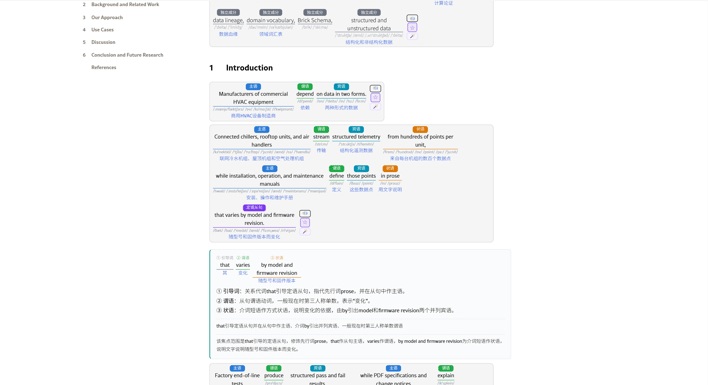
- Visualization of sentence breakdown+detailed explanation of each componentThe entire paragraph is broken down, and each component is given a Chinese definition and function; First read according to the structure, then divide it yourself and gradually detach from the tool to read the original text directly.
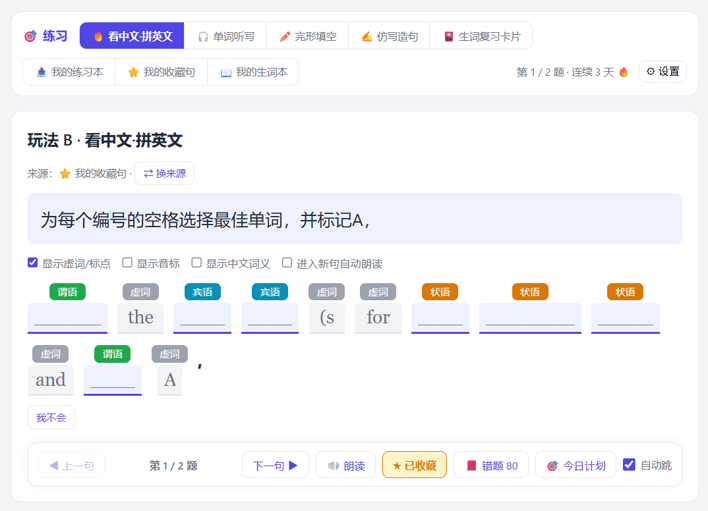
- Build sentences/write words to practice combination senseComplete the sentence, translate from Chinese to English word by word, imitate and transcribe the words, and repeatedly use them in the sentence.
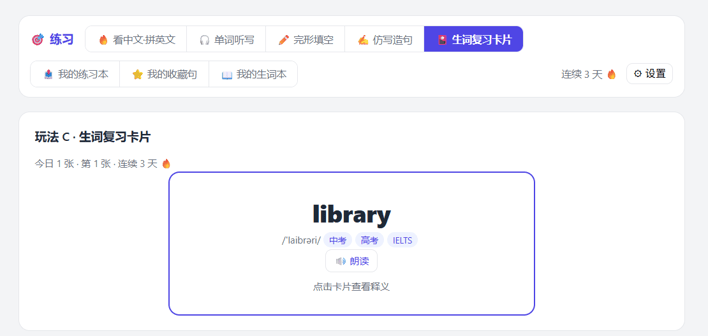
- Arrange new words according to the forgetting curveWords in the vocabulary book repeat at intervals, with longer intervals for correct answers and earlier returns for incorrect answers, and reunite at critical points.
- String a line to the end: Word picking → Sentence breaking → Detailed explanation → Vocabulary book → Review → Practice, not applicable; I can come back and practice the sentences I have read.
- The final step has also been completedPDF can be directly imported and any content can be copied and pasted to open; Paper books can still be opened by taking photos, recognizing text on WeChat, and pasting them in. From now on, there is no shortage of entrances for long articles, test papers, and textbooks outside of the webpage.
- The interface is deliberately made lightThe card appears with the original sentence attached, without pop ups or covering the main text; Unused entrances can be directly turned off, with only a few lines of switches set.
Shortcomings of similar tools
- Full page translation/browser translation pluginOnly provide translation, skip structure; Whole page replacement can also disrupt formatting and reading positions.
- Online syntax analysis toolTo upload the original text and register, the analysis results are in English terms, lacking Chinese definitions for each component.
- General AI dialogue toolCopy it out and ask, then paste it back in, the answer does not fall on specific sentences, and the vocabulary and review do not settle.
- Vocabulary Learning AppThere is a forgetting curve, but only memorizing word meanings without entering sentences, and recording meanings rather than usage.
- A tool that only serves web pagesAs soon as I leave the browser, the file will crash, PDF、 There is no entrance for the test paper and paper book, either manually reprint or give up.
Core Features and Functions
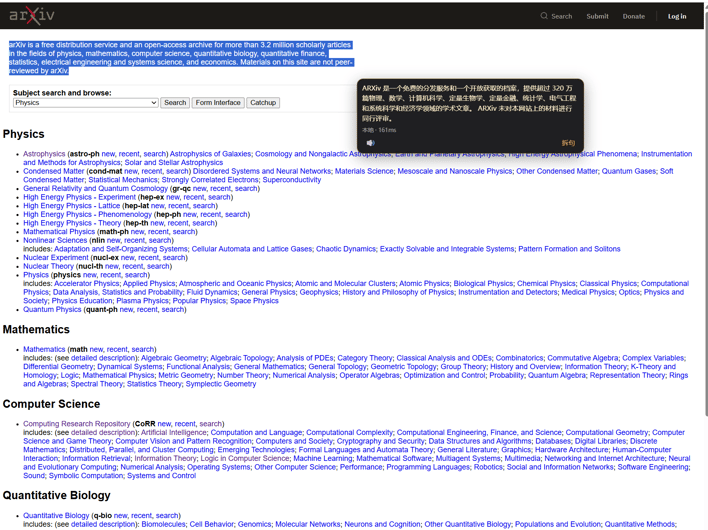
- Select Translation(Free, millisecond level, Chrome only): Select an English paragraph, and a Chinese translation and reading button will immediately appear next to the selection, without the need to split the sentence first; Click 'split sentence' on the same sentence and reuse the result directly without repeating the request. This defaults to local translation in the browser: the translation is calculated on the end, does not go online, does not consume points, and has no limit on the number of times. Just click "Download Local Translation Model" once on the settings page (about 167 MB). Cutting to the 'big model' can simultaneously obtain temporal and other details, and that path is calculated based on the quota. Local translation is only available for desktop Chrome 138 and above (Edge/Safari/mobile do not have this API); When these sources are left in 'local' on these browsers, select 'do not pop up'. If you need a translation, please switch the source to 'big model', or press Alt+X/right-click to view each component in Chinese.
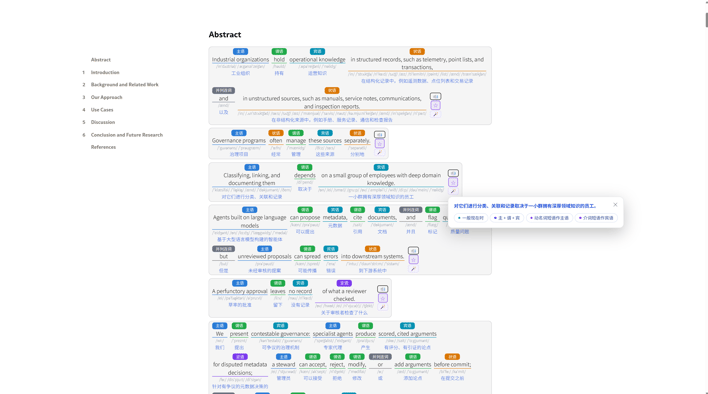
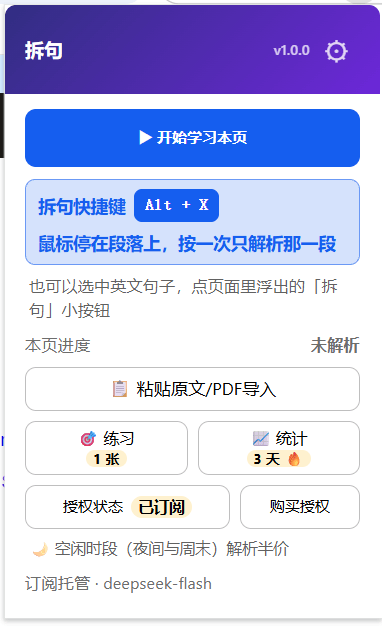
- Whole page/paragraph by sentence(Deduct points, cache hit not double deducted): Pop up main button ▶ Start learning this page "and study the entire page; Stop the mouse on a certain segment and press
Alt+X(Mac⌥+X)Only open that section, you can press directly even if the session hasn't started; After selecting the text, click the "Split Sentence" button that appears in the bottom right corner of the selection area to replace each paragraph (select and split several paragraphs); The right-click menu also has the option to 'parse selected text/parse this area'. - Ingredient card(No additional deduction, settled together with the previous one): Subject verb object definite clause and five types of subordinate clauses are colored component by component, and the "role/English original text/Chinese definition" three lines are compared, with the translation of the entire sentence, tense, and sentence pattern labels given at the beginning; Scroll to where to parse, component flow appears, there is no need to wait for the entire section to run.
- Detailed explanation of ingredients(Deduct points, expand for the first time at each location; do not deduct from cache after hitting): Expand the internal structure, grammar points, and overall explanation of any component at that location; If you are not satisfied with the result, you can write a statement to ask it to be parsed again, and the parsed result will be cached separately.
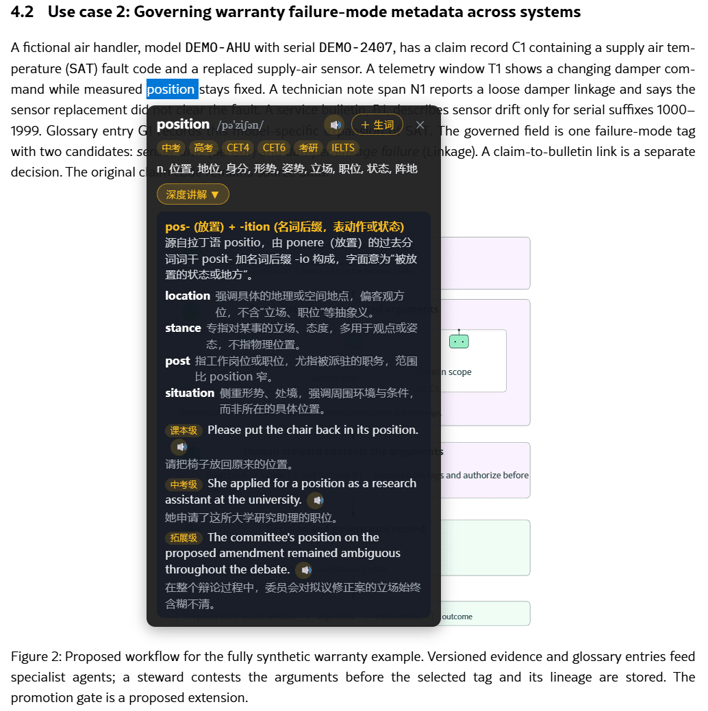
- Double click to select words(Free word selection; deduction of points for in-depth explanation): Built in local dictionary with approximately 48000 entries, providing phonetic symbols, exam labels (high school entrance examination/college entrance examination/CET4/CET6/postgraduate entrance examination/IELTS/TOEFL), definitions, and pronunciations; Click to pronounce in point reading mode; Word cards can also ask models to provide in-depth explanations (root and affix analysis, synonyms analysis, graded example sentences), and high-frequency word results can be cached locally.
- read aloud(Free): Read the entire sentence aloud and highlight each component according to the pronunciation. When the engine does not report word boundaries, it will automatically switch to reading paragraph by paragraph; The speech rate is adjustable in seven levels of 0.5-1.5, and the settings for web cards, word retrieval, pasting pages, and practice pages are the same.
- Vocabulary Book and Review(Free): Double click to enter the book, and the collected words will be displayed with dashed lines on regular web pages without opening sentences; Review cards by pressing 1/2/4/7/15 Tianwu interval scrolling, both vocabulary and sentence collections support CSV and Anki export.
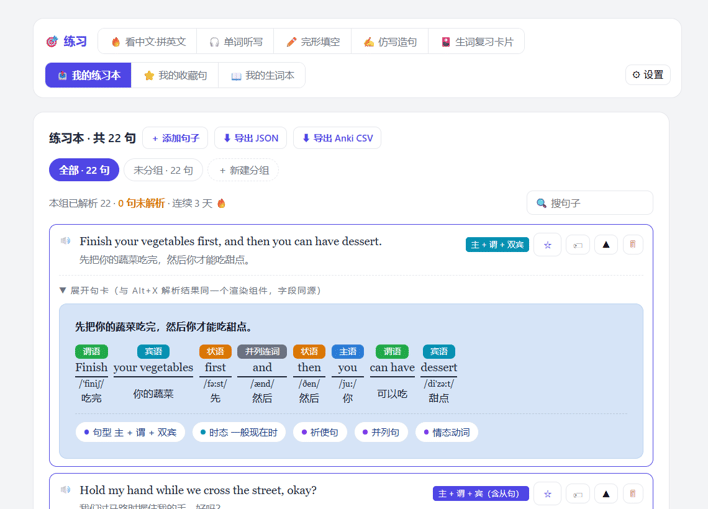
- Sentence collection(Free): Collect and break down the entire sentence, export full field CSV and Anki CSV.
- exercise book(Local gameplay and scoring are free; AI blank selection and AI question deduction): Upload or paste your own sentences, watch Chinese and English spelling, word dictation, cloze test, imitation writing and sentence construction, and new word review cards. There are also AI blank selection and AI question deduction; If you answer correctly, check in and record the number of words received/reviewed/collected/analyzed, as well as the number of consecutive days.
- Import and Cache(Free text extraction; points deducted for parsing, cache hits not deducted): The text can be directly pasted into " 📋 Paste the original text/PDFImport ", or drag into the local PDF to extract text layer parsing; The parsing results are cached by sentence, reused across pages, can be exported/imported, can set an upper limit (10-2048 MB), and can be cleared with one click.
- Reversible substitution(Free): "Stop and restore the original text" at any time, with the page structure remaining unchanged;
chrome://Internal pages of browsers such as extension pages, app stores, and PDF viewers cannot be injected and will prompt to paste the main text into them 📋 Paste the original text/PDFImport "- copying it out can still be disassembled; localfile://The HTML page can also be disassembled by manually opening the 'Allow access to file URLs' option on the extension details page. - The boundary between free and pointsWord lookup, reading aloud, vocabulary book, sentence collection, review, and practice grading are all completed locally, without internet connection or deduction of points; There are only seven places to truly adjust the model - whole page/paragraph selection/pasting and breaking down sentences, detailed explanation of ingredients, in-depth explanation of words, selection and translation (when cutting to the "big model"), cloze "teacher selects exam points", exercise book "AI questions", and writing a sentence to "re explain" it. The daily trial limit is automatically replenished (currently 20 points), and the remaining amount and the next reset time are written in the "Subscription and Authorization" card on the settings page; The points are converted based on the actual model usage observed by the gateway - the consumption that has already been generated will not be refunded due to failure or interruption, please treat it as' real burning deducted '; Half price analysis during free time periods such as nighttime, lunch break, and weekends.
Technical Support and Services
Feedback channels and responses
- Two entrances: Feedback entry on the product page, or the "Feedback" button within the extension; The more specific the description, the better (error page, prompt text, actions taken at the time).
- Response time limitWe will reply as soon as possible; Both functional suggestions and defects will be recorded and followed up on.
Authorization, Quota, and Orders
- Verify vouchersFor issues related to authorization, credit limits, and orders, please contact us with your order email for verification and resolution.
- number of devicesUp to 3 devices can be authorized under the same license; When changing devices, first unbind the "Subscription and Authorization" card on the settings page, and then reactivate it on the new device.
- Credit limitThe purchased limit is valid for a long time and the balance accumulates. After using it up, you can add purchases on the product page.
Update and Maintenance
- Version UpdateThe new version is released with the installation package of the distribution channel. After overwriting the files in the decompression directory, click "reload" on the extension management page once.
- Upgrading does not affect the credit limitLimit and authorization do not expire with version upgrades.
frequently asked questions
Q: Will the data be uploaded? A: Double click word retrieval, vocabulary book, review, reading aloud, sentence collection, practice grading, and learning statistics are all completed locally, without internet connection or upload. Only when you actively break down sentences, expand explanations, conduct in-depth word search explanations, or use AI to select blanks/AI questions on the practice page, will the corresponding sentences (or Chinese materials you wrote) be sent to the model through the hosting gateway; The gateway does not record prompts and model body, and is not used for training.
Q: How is the credit limit calculated? A: Quantitative quota system. Sentence splitting, detailed explanation of ingredients, in-depth explanation of words, AI blank selection and AI question answering will be charged based on the actual points consumed. The credit limit package is permanently valid, and the balance will be accumulated. Additional purchases can be made after use; The first run automatically earns a daily trial of 20 points. When selecting a translation to go to "local" mode, no points will be charged (online inference, no network access, no limit on the number of times), and only when switching to "large models" will it be charged. Half price analysis at night and on weekends; The actual deduction shall be based on the gateway bill, and the incurred consumption shall not be refunded due to failure or interruption.
Q: Can it be used offline? A: Word lookup, reading aloud, vocabulary book, review, sentence collection, practice grading and statistics can all be used offline; Sentence splitting and AI explanation require online calling of hosted models.
Q: Where to install it? What browsers are supported? A: Chrome 120+, Edge and other Chromium based browsers are also available. The installation package is zip: after extracting to a fixed directory, open "Developer Mode" on the extension management page and "Load the decompressed extension program". For specific steps, see the "Installation Instructions" below.
Q: Will it change the webpage I see? A: The replacement is reversible, and it can be completely restored by "stopping and restoring the original text" at any time without changing the site structure; The card will not interrupt your reading position.
Q: Can data be exported? A: Both the vocabulary and sentence collection support CSV and Anki exports; The parsing cache can also be exported as a file, and even after importing on a different device, the same sentence can still be directly hit (the cache key is independent of the account or model).
Installation/usage prerequisites
- System RequirementsChrome 120 and above, or Edge (also Chromium kernel) - download Chrome · EdgeBoth can be installed, and Edge's pronunciation is more natural when reading aloud. Due to network issues, Chrome may not be able to pronounce online in China. Local installation of voice is required. Please refer to the video for detailed instructions.
- The browser threshold for selecting translationsLocal translation is only available for desktop versions of Chrome 138 and above, Edge、Safari、 Mobile devices and earlier Chrome do not have this API - there is no pop-up card when selecting. If you need a translation, please switch the "Select Translation" source to "Large Model" (based on quota) on the settings page, or press Alt+X/right-click to view Chinese by component.
- Credit limitAfter installation, the first run will automatically receive a daily trial of 20 points, which can be used directly; When more quota is needed, fill in the license code activation in the "Subscription and Authorization" card on the settings page.
- Offline availabilityDouble clicking for word retrieval, vocabulary book, review, reading aloud, practice, and statistics are not connected to the internet and can still be used without activation.
Installation GuideCollapseExpand
After clicking on 'View and Download Software', if the plugin details page provides one click installation, simply install it. After installation, click on the pop-up window in the upper right corner ⚙ Go to the settings page: First, click on "Try" on the "Subscription and Authorization" card at the top, then click on the "Select Translation" tab at the top, and click on "Download Local Translation Model" (Chrome only, about 167 MB, only needed once). Before the download is completed, select the option and the translation will not be published (nor will it switch to a larger model for you). Once it is downloaded, it will be used for online inference without any online or point consumption. If there is no one click installation, it means it is still in the app store review period. Please manually load it according to the following text. Reading aloud on Edge sounds more natural, but local translation options are only available on Chrome: if you want to use instant Chinese translation, please install the Chrome version or switch the source of "selected translation" to "big model" on Edge (based on quota).
- Download installation packageClick on 'Download' on the product page to obtain
english-sentence-analyzer-v1.0.3.zipNo need to register an additional account. - Extract to a fixed directorySuggest creating a new one on drive D
english-sentence-analyzerfolder. The browser reads from this directory every time it starts, please do not delete or move it after installation. - Open the extension management page: Address bar input
chrome://extensions(Edge is)edge://extensions)Open the 'Developer Mode' in the upper right corner. - Load extensionClick on 'Load decompressed extension' and select the folder extracted in step 2 (which contains
manifest.jsonDon't go any deeper into that layer. The installation is complete when the "Split Sentence" icon appears on the toolbar. - Claim trial/activation quotaThe first installation automatically earns a daily trial of 20 points (if you haven't received it, click "Trial" on the "Subscription and Authorization" card on the settings page), which can be directly opened; When using up the trial or wanting to switch to a paid credit, fill in the license code on the same card and click "Activate", and the remaining credit and consumption will be visible.
- Start usingOpen any English webpage and click on ' ▶ Start learning this page "by breaking down the entire sentence; If you only want to split a paragraph, select that paragraph and click the "Split Sentence" button that appears in the bottom right corner of the selection area;
Alt+X(Mac⌥+X)Disassemble the paragraph where the mouse is located; Text or PDF available 📋 Paste the original text/PDFImport. - See guidanceThe first installation will automatically open the welcome page, where there are four steps to get started (double-click to pick up words/whole page or selected paragraph disassembly/text pasting/PDF import/practice and vocabulary review) and function screenshots. Afterwards, you can go to the settings page ↩ Use guidance to review at any time.
Common tips
- Occasionally, the browser prompts to 'disable developer mode extension', simply choose to keep it.
- Change computer: First unbind this device from the "Subscription and Authorization" card, and then reactivate it on the new device.
- Update version: Overwrite the files in the decompression directory with the new package, and then click 'reload' again on the extension management page.